
When the store is understaffed or the stock levels are low, you may want to pause taking orders coming via online ordering platforms - Uber, Deliveroo, Menulog, Doordash or the Muzz Buzz Rewardz App.
In this tutorial we will show you how to do it.
Of course, it is our recommendation that you use the integrated feature Lightspeed Delivery to send and manage your orders directly in your POS system rather than dealing with many tablets and systems.
Please, let us know if you'd like us to enable and set up this feature for you by sending us a message to support@muzzbuzz.com.au. This is a upgraded paid feature which is $80/month for Advanced Plan (500-100 orders per month).
If you do not use the Lightspeed Delivery feature then use these steps:
Uber
How to pause incoming orders:
- On the Uber tablet access your Uber Eats Orders.
- In the top left corner, select the menu icon.
- Tap the PAUSE NEW ORDERS button.
- Select how long you’d like to pause orders, then select a reason.
- Tap CONFIRM.
Uber Eats Orders may also automatically pause incoming orders. This can happen for two reasons:
- Multiple orders in a row that go unaccepted
- Longer than usual acceptance times, resulting in customers canceling orders
For a tutorial on how to pause incoming orders, please click here.
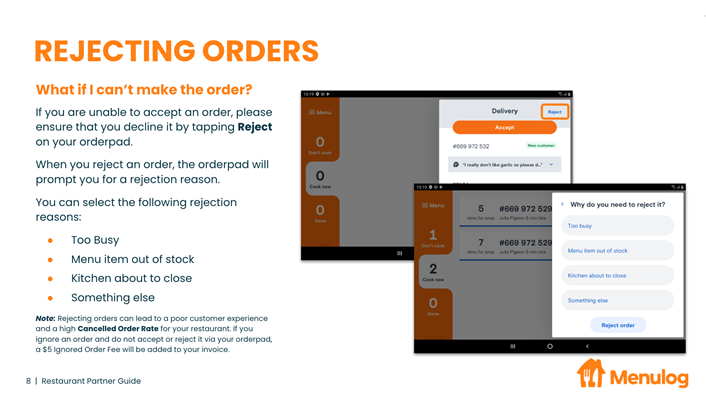
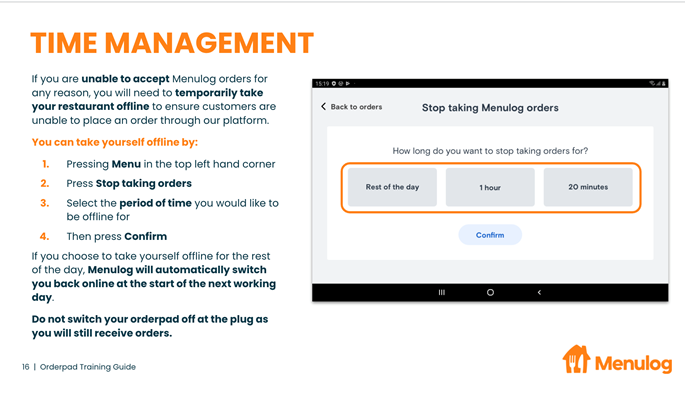
Menulog
Deliveroo
Just close the tablet for orders and reopen once the business is more manageable.
DoorDash
You can pause DoorDash orders by creating a temporary deactivation. If your store uses a tablet, you can use the tablet pause feature.
Creating a temporary deactivation
All restaurants can pause orders temporarily in three ways:
- Creating a temporary deactivation on the DoorDash Merchant Portal
- Chatting into support on the DoorDash tablet and asking to be paused for a given amount of time.
- Calling DoorDash support at 1800-958-316 and asking to be paused for a given amount of time.
Tablet pause feature
If your restaurant uses a DoorDash tablet, you can use the pause feature to temporarily deactivate directly through your tablet. Turning off your tablet will NOT pause new orders.
Want to Reactivate?
DoorDash Merchant Portal: Tap Resume on your Merchant portal
Muzz Buzz Rewardz App (Order Ahead feature)
It is strongly advised not to disable the online ordering functionality for the Muzz Buzz returning customers at anytime. If you still would like to disable it temporarily, please let us know at support@muzzbuzz.com.au, and we will help you to do it. It won't take long.
In all other cases - managing online orders workflow includes the step of accepting orders in your point-of-sale, and if you cannot service those customers who order online, please, simply do not accept the orders in your point-of-sale. The system will reject not accepted orders automatically and will send the message to your customers that their order has not been accepted.
Please, let us know if this article was helpful!
Comments
0 comments
Article is closed for comments.